 Fieldwise
Custom fields for your whole store. Without the busywork.
Add specs, size charts, care guides, badges, internal notes and any other data to products, variants, collections, customers, orders, pages and blogs. Then fill them in bulk, keep them correct and show them anywhere on your store.
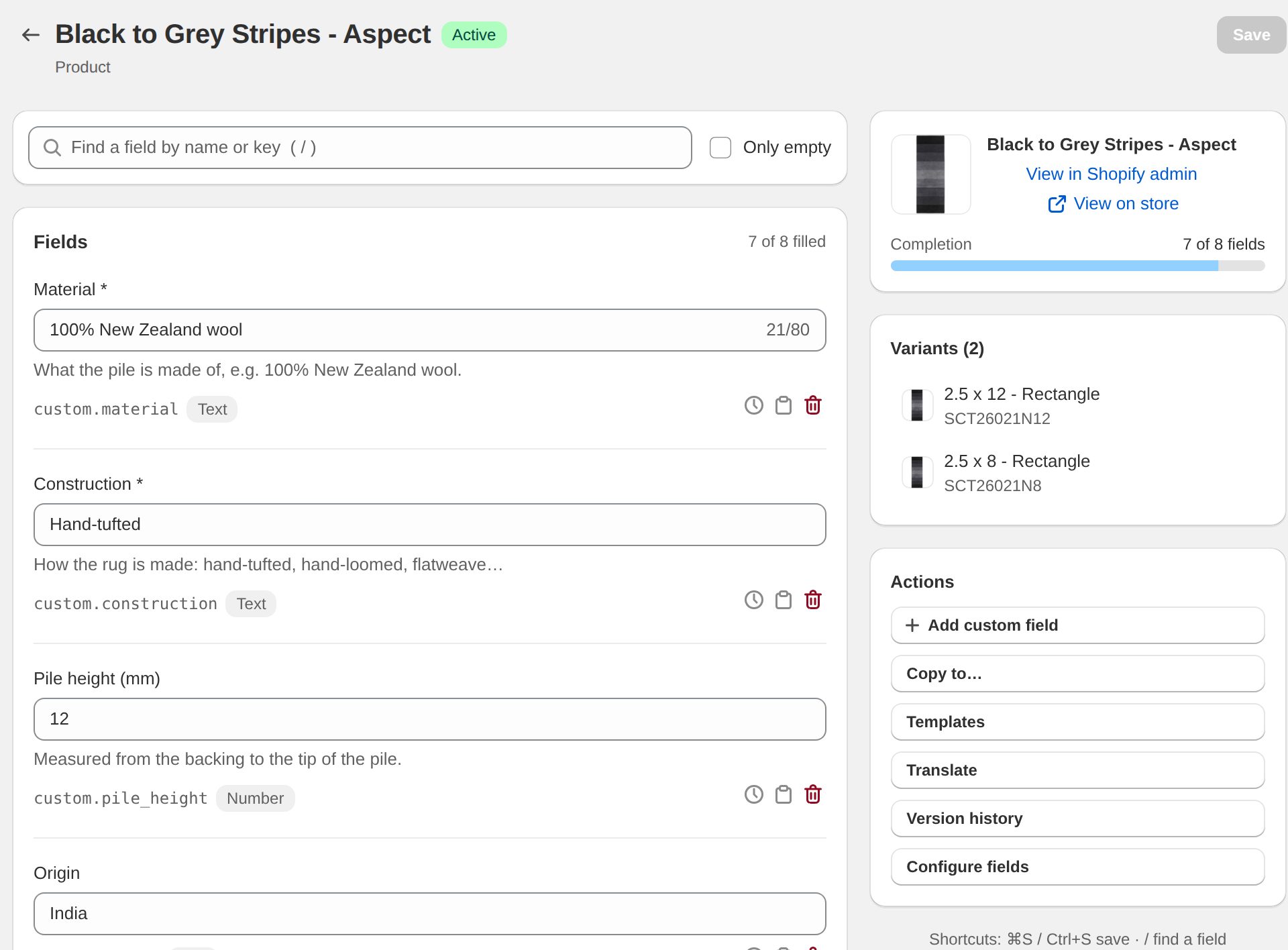
Shopify gives you metafields. We give you a way to manage them.
Shopify's built-in metafields are a great foundation, but filling hundreds of products one page at a time, fixing a bad import, or keeping a sale badge on schedule quickly gets painful.
Edit hundreds at once
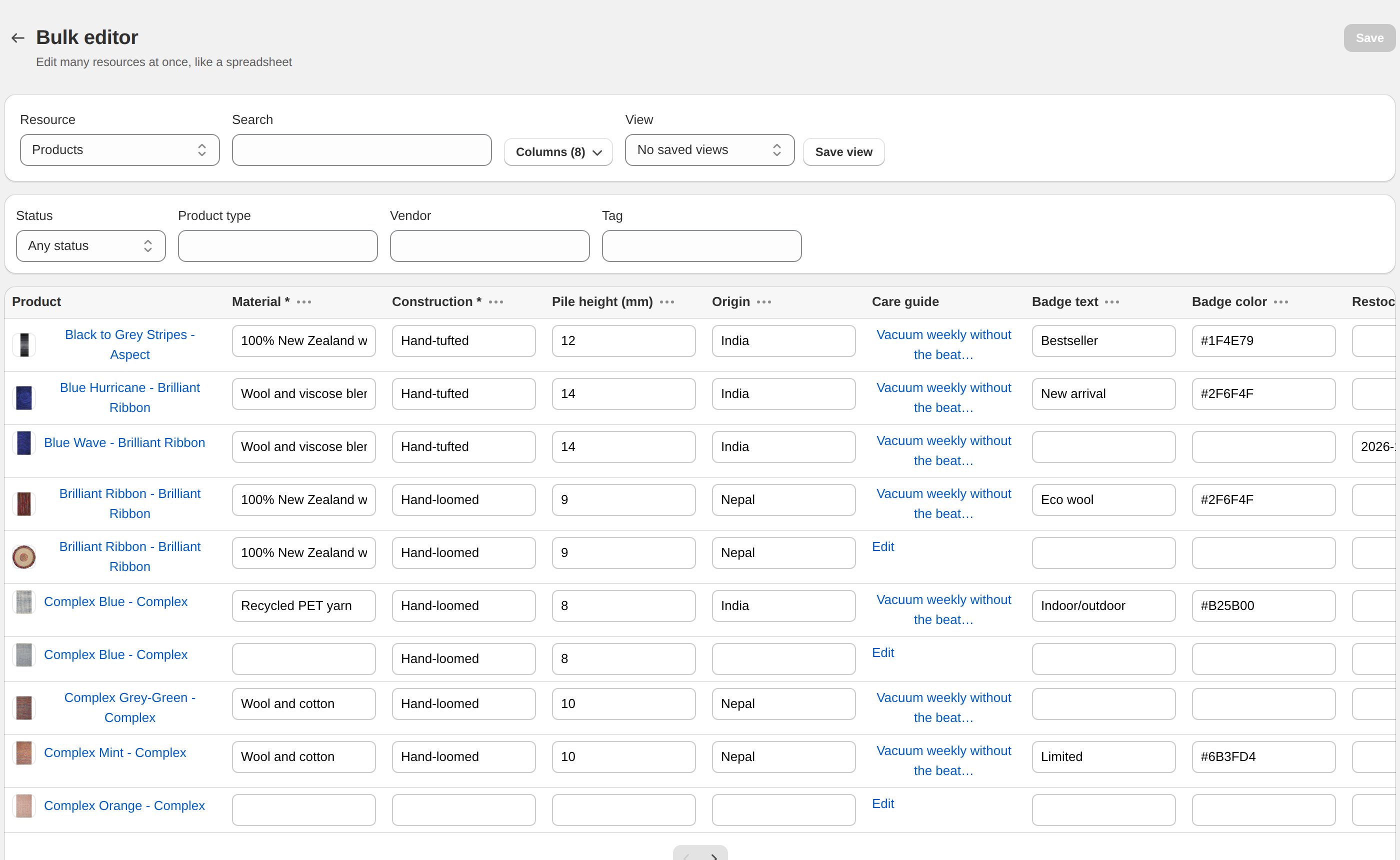
A spreadsheet view for every field, with filters by type, vendor, tag and status. Set, append, find & replace or clear a whole column on every matching product — and undo it.
Never lose a value
Check a CSV before you import it, skip empty cells, and undo a whole import in one click. Pro keeps 90 days of history for every field so you can restore anything.
Let it run itself
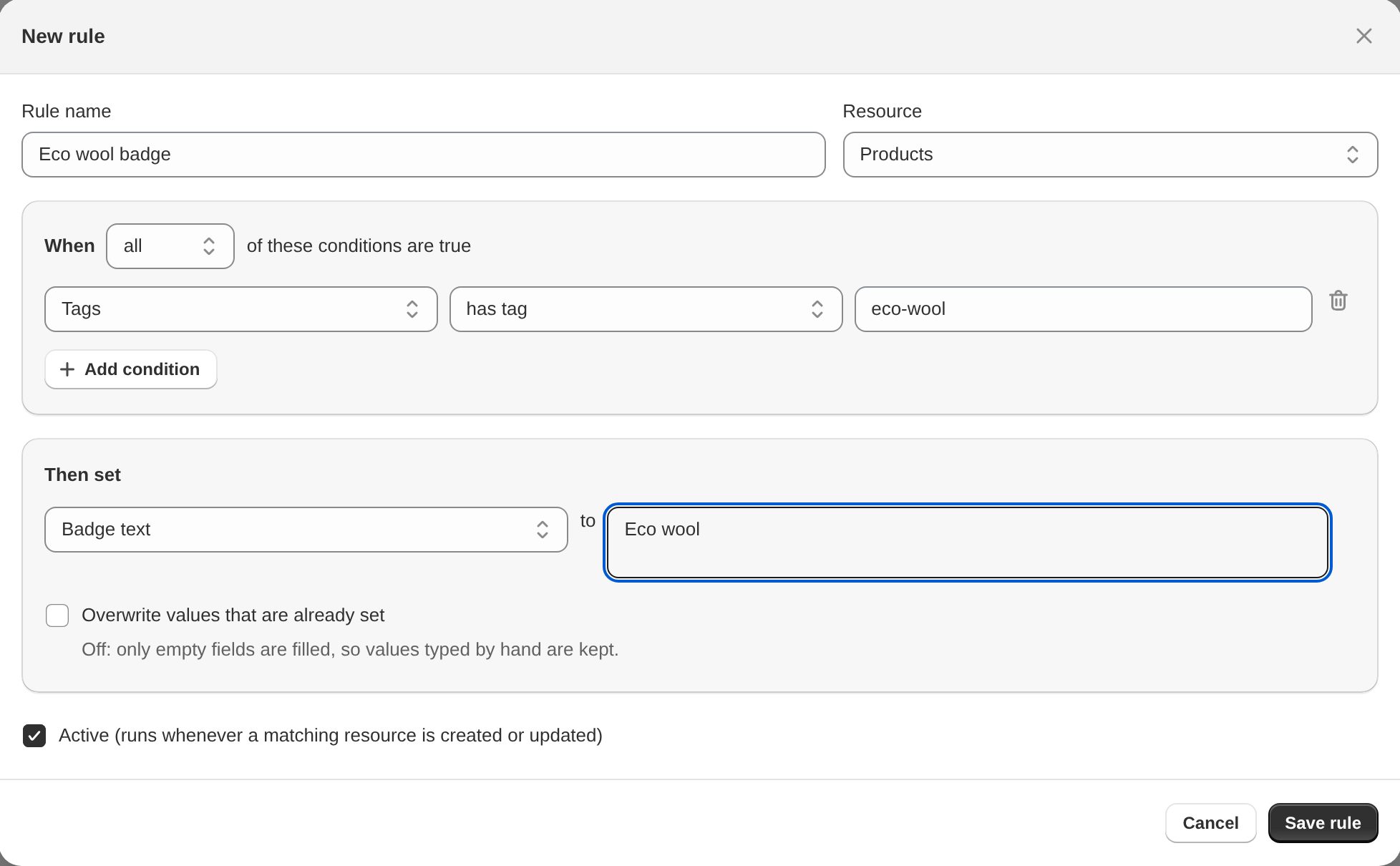
Automatic rules fill fields when products are created or changed. Scheduled changes switch a badge on Friday and off on Monday. Flow triggers connect it to everything else.
Keep data complete
Mark fields as required, set minimum and maximum length and add help text. The health check lists every product missing a required value.
The right fields for each product
Field sets show a field only where it belongs — a size chart for shirts, a voltage field for lamps — so your team isn't scrolling past twenty empty boxes.
Edit inside Shopify
Admin blocks put your key fields right on Shopify's own product, collection, customer and order pages. No switching apps to fix one value.
A spreadsheet for your custom data
Pick the fields you need, filter the products you care about and type straight into the grid. Save the setup as a view for next time.
- Filter by status, product type, vendor, tag or field set
- Column actions: set, append, prepend, find & replace, clear
- Apply to the page or to every matching product in the background
- Every column action can be undone
Rules and schedules do the routine work
Tell the app what should happen once, and it keeps your fields right as products come and go.
- Rules: when a product is created or updated and matches your conditions, set its fields
- Schedules: change values at a date and time, and change them back later
- Flow: start a Shopify Flow when a field changes or required fields are missing
Show any field on your store, no code
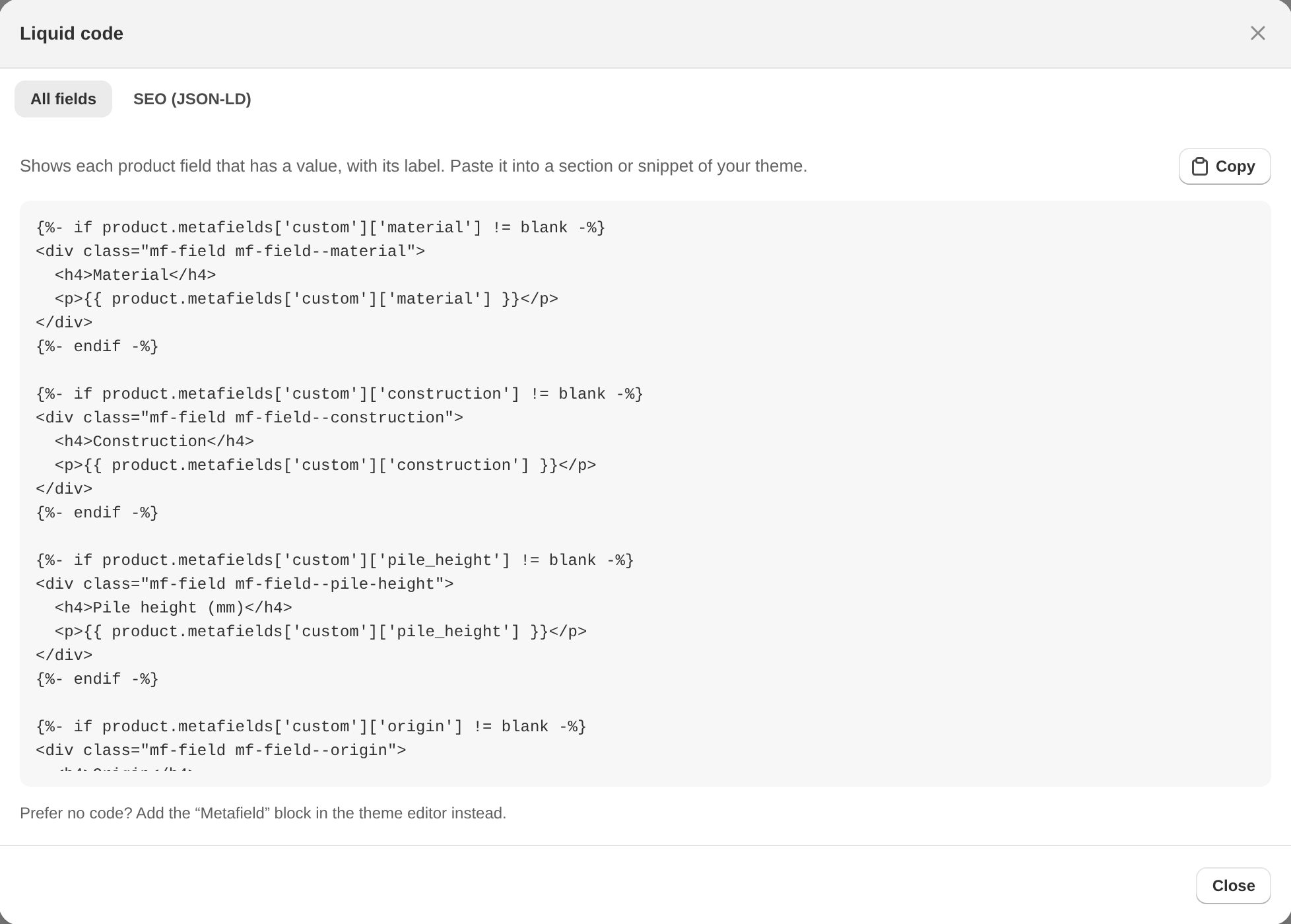
Add the "Metafield" app block in the theme editor and pick a field. Prefer code? The app writes the Liquid and JSON-LD for you.
- Theme block for Online Store 2.0 themes
- Copy-paste Liquid for every field and group
- Product structured data (JSON-LD) generator
- Image crop and focal point that your theme respects
Up and running in ten minutes
Define your fields
Choose where the field lives (products, customers, orders…), give it a name and a type, and group related fields together.
Fill them in
Use the editor, the bulk editor, a CSV import, global values or rules — whatever fits the job.
Show them anywhere
Add the theme block, paste the generated Liquid, or use the values in Flow, emails and other apps.
Same data. Far less effort.
Everything is saved as standard Shopify metafields, so your theme and other apps can read it — and it stays if you ever leave.
| Shopify admin | Fieldwise | |
|---|---|---|
| Bulk edit custom fields | PartialProducts, variants, collections and customers, up to 100 at a time | YesAlso orders, pages, blogs and posts · filters · column actions · undo |
| CSV import and export of metafields | PartialProduct CSV only — no variant metafields | YesEvery resource, dry run, one-click undo |
| Version history and restore | No | Yes90 days on Pro |
| Automatic rules and scheduled changes | DIYPossible with Shopify Flow, but you build each workflow | YesReady-made, no workflow building |
| Show a field only for some products | PartialCategory metafields follow Shopify's product categories | YesYour own fields, by type, vendor, tag, status… |
| Missing-data report | No | YesHealth check and Flow trigger |
Simple plans, billed through Shopify
Basic
Everything you need to manage custom data
- Fields on every resource, all field types
- Editor, bulk editor and global values
- CSV import with check and undo
- Admin blocks, theme block, Liquid generator
Pro
Automation, history and smarter forms
- Everything in Basic
- Automatic rules and scheduled changes
- Version history and one-click restore
- Field sets, cleanup and Flow triggers
Questions merchants ask
Will my theme be able to read the fields?
Yes. Every value is saved as a standard Shopify metafield, so your theme, Shopify Flow, email templates and other apps can use it. Use our theme block, the generated Liquid, or Shopify's own dynamic sources.
What happens to my data if I uninstall?
Your metafield values stay in Shopify — they belong to your store, not to us. The app's own settings (field layouts, rules, history) are deleted when you uninstall.
Can I import my existing data?
Yes. Export a CSV, fill it in a spreadsheet and import it back. "Check file" shows exactly what will change before anything is written, empty cells are skipped, and the whole import can be undone.
Does it work with variants, customers and orders?
Yes — fields work on products, variants, smart and custom collections, customers, orders, pages, blogs, blog posts and the shop itself.
Do I need a developer?
No. The theme block shows fields without code. If you do work with a developer, they'll appreciate the Liquid and JSON-LD generator.
Give your product data a proper home.
Install in a minute. Free setup help on every plan.